focus on electric meter manufacturing,
with technical support R&D team,
have more than 200 staffs,
modern production lines
| Availability: | |
|---|---|
| Quantity: | |
DDSY986
Tepsung
9028301300
1. Features
1.1 IC Card Prepaid Core Mechanism
Instant Recharge & Consumption Recording: Supports standard M1 IC card (or CPU card, optional) for prepaid operations. After purchasing electricity at a designated platform, users insert the IC card into the meter—data is read within 2 seconds, and the recharge amount is automatically added to the meter’s internal balance.
Balance Warning & Power-off Protection: When the remaining balance drops to the preset warning value (default 10kWh, adjustable), the LCD screen flashes and the built-in buzzer beeps intermittently to remind users to recharge. When the balance is exhausted, the meter automatically cuts off the power supply; power is restored immediately after reinserting a recharged IC card.
Anti-Tampering & Data Security: Equipped with an IC card encryption chip (supports 3DES encryption algorithm) to prevent fake cards or data tampering. The meter also records tampering events (e.g., illegal opening of the case, reverse wiring) and locks the power supply temporarily—users need to contact the management department to unlock it after verifying legitimacy.
Accurate Energy Calculation: Adopts a dedicated prepaid energy metering chip, with measurement accuracy strictly compliant with IEC 62053-21 Class 1 standard (error ≤±1%), ensuring accurate recording of every kWh of electricity consumed.
Multi-Information LCD Screen: 2.0-inch backlit LCD screen displays real-time data including remaining balance (kWh), cumulative consumption (kWh), current voltage/current, and latest recharge amount. The screen stays on for 30 seconds after card insertion (auto-off to save power when idle) and supports manual button activation for data query.
Flame-Retardant & Anti-Interference Design: Shell is made of ABS+PC flame-retardant material (V0 grade), which can withstand -25℃~70℃ operating temperature and resist moisture, dust, and electromagnetic interference (suitable for basements, outdoor distribution boxes).
Circuit Safety Protection: Built-in overvoltage protection (triggers when voltage >264V), overcurrent protection (cuts off power when current >1.2x rated current), and short-circuit protection (self-recovering fuse prevents burnout). It also has a reverse-wiring protection function—no power supply and no wrong measurement if live/neutral wires are connected reversely.
Rated Voltage: 220V AC (50Hz/60Hz, compatible)
Rated Current Range: 5A~60A (wide-range measurement, no need to replace meters for different load sizes)
Maximum Current: 80A (short-term, ≤30 minutes)
Voltage Measurement Range: 180V~276V AC
Power Factor Measurement Range: 0.3 (lagging)~1.0 (leading)
IC Card Type: M1 card (13.56MHz, ISO/IEC 14443A standard); CPU card (optional, supports PBOC 2.0)
IC Card Reading Distance: ≤5mm (insertion type, with anti-insertion-reverse structure)
Recharge Amount Range: 1kWh~9999kWh (single recharge); Maximum Cumulative Balance: 9999kWh
Measurement Unit: kWh (0.01kWh minimum resolution for balance and consumption)
Data Storage: Non-volatile memory (NVM) stores 12 months of recharge/consumption records (not lost when power is off)
Installation Size: 18mm (thickness) × 85mm (height) × 60mm (width)
Mounting Type: Standard 35mm DIN rail (compatible with most distribution boxes)
Terminal Compatibility: 6mm²~25mm² copper/aluminum core wires (with anti-loosening screws)
Operating Temperature: -25℃~70℃
Storage Temperature: -40℃~85℃
Relative Humidity: ≤95% (non-condensing, no dew formation)
Protection Grade: IP40 (dustproof, protected against solid objects ≥1mm)
Parameter Verification: Confirm the meter’s rated voltage/current matches the on-site power supply (e.g., 220V for residential use, avoid 380V connection).
IC Card Initialization: Before installation, the management department needs to initialize the IC card (write basic information such as meter ID, address, and initial warning value) to ensure the card is paired with the meter.
Tool Preparation: Prepare a PH2 cross screwdriver, wire stripper (stripping length: 8~10mm), and insulation tape (for processing wire ends).
Fix the Meter: Open the distribution box, align the meter’s DIN rail slot with the 35mm rail, push upward until it clicks (ensure no looseness; use a screwdriver to assist if stuck).
Wiring Operation: Connect the live wire (L) to the "Input L" terminal, neutral wire (N) to "Input N" terminal; connect the load’s live/neutral wires to "Output L" and "Output N" terminals. Tighten screws with 2.0N·m torque (avoid over-tightening to damage terminals).
Initialization Activation: Insert the initialized IC card into the meter’s card slot (chip side up), wait for the screen to display "Card Accepted" (about 2 seconds), then remove the card—the meter enters normal working mode.
Power-On Test: Turn on the main switch, check if the LCD screen displays voltage/current (should match on-site values); insert the recharged IC card again to confirm the balance is added correctly.
Recharge & Query: After purchasing electricity, insert the IC card into the meter (hold for 2 seconds) to complete recharge; press the "Query" button to view remaining balance, cumulative consumption, and latest recharge record.
Common Faults:
If the card is unrecognized (screen shows "Invalid Card"), check if the card is initialized, chip is clean, or insertion direction is correct.
If power is cut off but balance remains, check for overvoltage/overcurrent (screen shows "OV" or "OC")—turn off the main switch, eliminate circuit faults, then reset by inserting the IC card.
Maintenance Tips: Clean the card slot with a dry cotton swab every 6 months (avoid water or alcohol); do not disassemble the meter privately (will trigger tampering protection).
Apartment Buildings & Villas: Solves the problem of "difficult electricity fee collection" for property management—users pay first and use later, avoiding arrears. Suitable for households with air conditioners, water heaters, and other high-power appliances (5A~60A wide current range meets most residential loads).
Rental Houses: Landlords can set a fixed warning balance (e.g., 5kWh) to remind tenants to recharge; the meter’s consumption records help avoid disputes over electricity fees (tenants can check cumulative usage via the IC card).
Small Retail Stores & Restaurants: Applicable to shops with independent metering needs (e.g., convenience stores, snack bars). The instant power-off function ensures businesses do not use electricity in arrears; the anti-tampering design prevents illegal electricity stealing (common in commercial areas).
Office Buildings & Business Parks: Used for metering of independent offices or shared spaces (e.g., meeting rooms, pantry). The RS485 communication interface (optional) supports connection to the building’s energy management system, enabling centralized monitoring of each office’s electricity usage.
Factory Dormitories & Staff Quarters: Factories can manage employees’ electricity usage by issuing IC cards (set monthly quota or allow self-recharge), helping control auxiliary energy costs (avoids waste from excessive use of electric heaters, air conditioners).
Temporary Construction Sites: Suitable for temporary living areas (e.g., construction worker dormitories) or temporary equipment (e.g., small mixers). Its dustproof, moisture-proof, and wide-temperature resistance properties adapt to harsh on-site environments; the prepaid mode avoids complicated post-construction fee settlement.
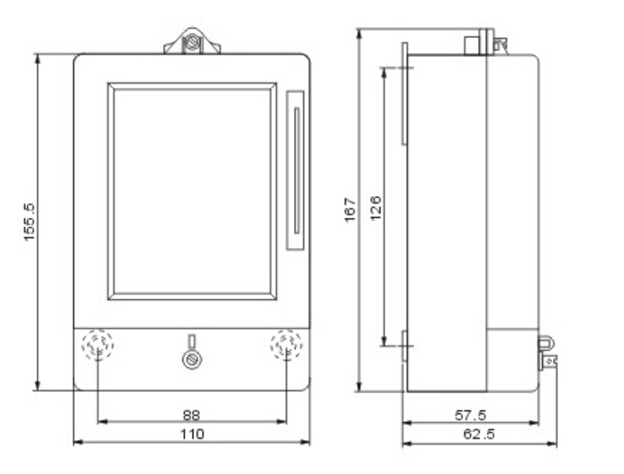
Outer and mounting dimension

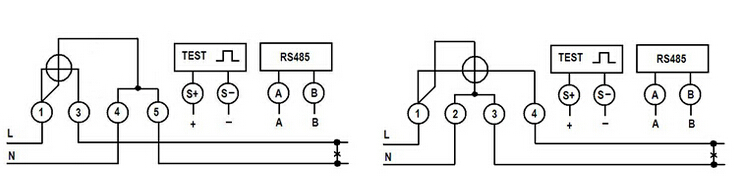
Wiring diagram

1. Features
1.1 IC Card Prepaid Core Mechanism
Instant Recharge & Consumption Recording: Supports standard M1 IC card (or CPU card, optional) for prepaid operations. After purchasing electricity at a designated platform, users insert the IC card into the meter—data is read within 2 seconds, and the recharge amount is automatically added to the meter’s internal balance.
Balance Warning & Power-off Protection: When the remaining balance drops to the preset warning value (default 10kWh, adjustable), the LCD screen flashes and the built-in buzzer beeps intermittently to remind users to recharge. When the balance is exhausted, the meter automatically cuts off the power supply; power is restored immediately after reinserting a recharged IC card.
Anti-Tampering & Data Security: Equipped with an IC card encryption chip (supports 3DES encryption algorithm) to prevent fake cards or data tampering. The meter also records tampering events (e.g., illegal opening of the case, reverse wiring) and locks the power supply temporarily—users need to contact the management department to unlock it after verifying legitimacy.
Accurate Energy Calculation: Adopts a dedicated prepaid energy metering chip, with measurement accuracy strictly compliant with IEC 62053-21 Class 1 standard (error ≤±1%), ensuring accurate recording of every kWh of electricity consumed.
Multi-Information LCD Screen: 2.0-inch backlit LCD screen displays real-time data including remaining balance (kWh), cumulative consumption (kWh), current voltage/current, and latest recharge amount. The screen stays on for 30 seconds after card insertion (auto-off to save power when idle) and supports manual button activation for data query.
Flame-Retardant & Anti-Interference Design: Shell is made of ABS+PC flame-retardant material (V0 grade), which can withstand -25℃~70℃ operating temperature and resist moisture, dust, and electromagnetic interference (suitable for basements, outdoor distribution boxes).
Circuit Safety Protection: Built-in overvoltage protection (triggers when voltage >264V), overcurrent protection (cuts off power when current >1.2x rated current), and short-circuit protection (self-recovering fuse prevents burnout). It also has a reverse-wiring protection function—no power supply and no wrong measurement if live/neutral wires are connected reversely.
Rated Voltage: 220V AC (50Hz/60Hz, compatible)
Rated Current Range: 5A~60A (wide-range measurement, no need to replace meters for different load sizes)
Maximum Current: 80A (short-term, ≤30 minutes)
Voltage Measurement Range: 180V~276V AC
Power Factor Measurement Range: 0.3 (lagging)~1.0 (leading)
IC Card Type: M1 card (13.56MHz, ISO/IEC 14443A standard); CPU card (optional, supports PBOC 2.0)
IC Card Reading Distance: ≤5mm (insertion type, with anti-insertion-reverse structure)
Recharge Amount Range: 1kWh~9999kWh (single recharge); Maximum Cumulative Balance: 9999kWh
Measurement Unit: kWh (0.01kWh minimum resolution for balance and consumption)
Data Storage: Non-volatile memory (NVM) stores 12 months of recharge/consumption records (not lost when power is off)
Installation Size: 18mm (thickness) × 85mm (height) × 60mm (width)
Mounting Type: Standard 35mm DIN rail (compatible with most distribution boxes)
Terminal Compatibility: 6mm²~25mm² copper/aluminum core wires (with anti-loosening screws)
Operating Temperature: -25℃~70℃
Storage Temperature: -40℃~85℃
Relative Humidity: ≤95% (non-condensing, no dew formation)
Protection Grade: IP40 (dustproof, protected against solid objects ≥1mm)
Parameter Verification: Confirm the meter’s rated voltage/current matches the on-site power supply (e.g., 220V for residential use, avoid 380V connection).
IC Card Initialization: Before installation, the management department needs to initialize the IC card (write basic information such as meter ID, address, and initial warning value) to ensure the card is paired with the meter.
Tool Preparation: Prepare a PH2 cross screwdriver, wire stripper (stripping length: 8~10mm), and insulation tape (for processing wire ends).
Fix the Meter: Open the distribution box, align the meter’s DIN rail slot with the 35mm rail, push upward until it clicks (ensure no looseness; use a screwdriver to assist if stuck).
Wiring Operation: Connect the live wire (L) to the "Input L" terminal, neutral wire (N) to "Input N" terminal; connect the load’s live/neutral wires to "Output L" and "Output N" terminals. Tighten screws with 2.0N·m torque (avoid over-tightening to damage terminals).
Initialization Activation: Insert the initialized IC card into the meter’s card slot (chip side up), wait for the screen to display "Card Accepted" (about 2 seconds), then remove the card—the meter enters normal working mode.
Power-On Test: Turn on the main switch, check if the LCD screen displays voltage/current (should match on-site values); insert the recharged IC card again to confirm the balance is added correctly.
Recharge & Query: After purchasing electricity, insert the IC card into the meter (hold for 2 seconds) to complete recharge; press the "Query" button to view remaining balance, cumulative consumption, and latest recharge record.
Common Faults:
If the card is unrecognized (screen shows "Invalid Card"), check if the card is initialized, chip is clean, or insertion direction is correct.
If power is cut off but balance remains, check for overvoltage/overcurrent (screen shows "OV" or "OC")—turn off the main switch, eliminate circuit faults, then reset by inserting the IC card.
Maintenance Tips: Clean the card slot with a dry cotton swab every 6 months (avoid water or alcohol); do not disassemble the meter privately (will trigger tampering protection).
Apartment Buildings & Villas: Solves the problem of "difficult electricity fee collection" for property management—users pay first and use later, avoiding arrears. Suitable for households with air conditioners, water heaters, and other high-power appliances (5A~60A wide current range meets most residential loads).
Rental Houses: Landlords can set a fixed warning balance (e.g., 5kWh) to remind tenants to recharge; the meter’s consumption records help avoid disputes over electricity fees (tenants can check cumulative usage via the IC card).
Small Retail Stores & Restaurants: Applicable to shops with independent metering needs (e.g., convenience stores, snack bars). The instant power-off function ensures businesses do not use electricity in arrears; the anti-tampering design prevents illegal electricity stealing (common in commercial areas).
Office Buildings & Business Parks: Used for metering of independent offices or shared spaces (e.g., meeting rooms, pantry). The RS485 communication interface (optional) supports connection to the building’s energy management system, enabling centralized monitoring of each office’s electricity usage.
Factory Dormitories & Staff Quarters: Factories can manage employees’ electricity usage by issuing IC cards (set monthly quota or allow self-recharge), helping control auxiliary energy costs (avoids waste from excessive use of electric heaters, air conditioners).
Temporary Construction Sites: Suitable for temporary living areas (e.g., construction worker dormitories) or temporary equipment (e.g., small mixers). Its dustproof, moisture-proof, and wide-temperature resistance properties adapt to harsh on-site environments; the prepaid mode avoids complicated post-construction fee settlement.
Outer and mounting dimension

Wiring diagram

